11+ Year IT Industry Experience, Working as Technical Lead with Capgemini | Consultant | Leadership and Corporate Trainer | Motivational and Technical Speaker | Career Coach | Author | MVP | Founder Of RVS Group | Trained more than 4000+ IT professionals | Azure | DevOps | ASP.NET | C# | MVC | WEB API | ANGULAR | TYPESCRIPT | MEAN | SQL | SSRS | WEB SERVICE | WCF... https://bikeshsrivastava.blogspot.in/ http://bikeshsrivastava.com/
Monday, March 14, 2016

Event Handling in AngularJs.

While making more progressed AngularJS applications, eventually your application should handle DOM events like mouse clicks, moves, keyboard presses, change events etc. AngularJS has a basic model for how to add event listeners members to the HTML you create from your perspectives. This content will clarify this model.
For Video session visit:Event handling
Event Handling flow
Event Handling Flow chart
Event Listener Directives in AngularJs:-
 You can  use an event listener to an HTML element using one of the AngularJS event  listener  directives:-
  1. ng-click
  2. ng-dbl-click
  3. ng-mousedown
  4. ng-mouseup
  5. ng-mouseenter
  6. ng-mouseleave
  7. ng-mousemove
  8. ng-mouseover
  9. ng-keydown
  10. ng-keyup
  11. ng-keypress
  12. ng-change
Basic event listener directive example in AngularJs:-

<!DOCTYPE html>
<html lang="en">
<head>
<script src="https://ajax.googleapis.com/ajax/libs/angularjs/1.2.5/angular.min.js"></script>
</head>
<body ng-app="app">
<div ng-controller="Myctrl" >
<div ng-click="Data.dataClick ()">Submit</div>
</div>
<script>
angular.module("app", [])
.controller("myctrl", function($scope) {
$scope.Data = {};
$scope.Data.dataClick = function() {
alert("clicked on button!!");
}
} );
</script>
</body> 
</html>

Description:-
    When you tap the internal div of the above illustration, the "Data.dataClick()" function will called. As should be obvious in the controller functions , the "Data" object has a "dataClick()" functions added to it.

As should be obvious, joining events to HTML DOM components is very little not the same as creating the HTML in any case. The event listener functions called are functions added to the "$scope" object by the controller functions .

parameterized($event) event listener directive example in AngularJs:-
<!DOCTYPE html>
<html lang="en">
<head>
<script src="https://ajax.googleapis.com/ajax/libs/angularjs/1.2.5/angular.min.js"></script>
</head>
<body ng-app="app">
<div ng-controller="myctrl" >
<div ng-click="Data.dataClick($event)">Submit</div>
</div>
<script>
angular.module("app", [])
.controller("myctrl", function($scope) {
$scope.Data = {};
$scope.Data.dataClick = function(event) {
alert("clicked Event : " + event.clientX + ", " + event.clientY);
}
} );
</script>
</body> 
</html>
parameterized($event,item) event listener directive example in AngularJs:-

<!DOCTYPE html>
<html lang="en">
<head>
<script src="https://ajax.googleapis.com/ajax/libs/angularjs/1.2.5/angular.min.js"></script>
</head>
<body ng-app="app">
<div ng-controller="myctrl" >
<ul>
<li ng-repeat="item in Data.items"
ng-click="Data.dataClick(item, $event)">Submit</li>
</ul>
</div>
<script>
angular.module("app", [])
.controller("myctrl", function($scope) {
$scope.Data = {};
$scope.Data.items = [{ v: "1"}, { v: "2"}, { v : "3"} ];
$scope.Data.dataClick = function(item, event) {
alert("clicked Event: " + item.v + " @ " + event.clientX + ": " + event.clientY);
}
} );
</script>
</body> 

</html>

Description:-
   In this example iterates through a list of "items" data, generates li elements from them, and adds click listeners to each li html  element. Along with the call to the click listener is passed the item JavaScript object the li  html element was generated based on, along with the click event object "($event)".


Bikesh Srivastava AngularJs
Monday, March 7, 2016

CRUD Operation using MVC with AngularJS

In this blog we will create an ASP.NET MVC  Application with AngularJS and perform CRUD (Create, Read, Update and Delete) operations, using Single Page Application on Visual Studio 2012.with Entity framework step by step.
Step 1:-Create a MVC Empty  Application.
Step 2:-Create a Model class with name as "Book.cs" and add below listed properties.
public class Book
{
[Key]
public int Id { get; set; }
public string Title { get; set; }
public string Author { get; set; }
public string Publisher { get; set; }
public string Isbn { get; set; }
}
Step 3:- Add "BookDBContext.cs" class in the model folder and add below code.
public class BookDBContext : DbContext
{
public DbSet<Book> book { get; set; }
}
Step 4:- Install Entity framework from Nuget package and add your Entity model in your                     application from database ,also configure your connection string properly .
              How to use Entity Framework in MVC  
Step 5:- Now let's add controller name as "HomeController" to get, add, edit and delete                        book records.
public class HomeController : Controller
{
// GET: Book
public ActionResult Index()
{
return View();
}
// GET: All books
public JsonResult GetAllBooks()
{
using (BookDBContext contextObj = new BookDBContext())
{
var bookList = contextObj.book.ToList();
return Json(bookList, JsonRequestBehavior.AllowGet);
}
}
//GET: Book by Id
public JsonResult GetBookById(string id)
{
using (BookDBContext contextObj = new BookDBContext())
{
var bookId = Convert.ToInt32(id);
var getBookById = contextObj.book.Find(bookId);
return Json(getBookById, JsonRequestBehavior.AllowGet);
}
}
//Update Book
public string UpdateBook(Book book)
{
if (book != null)
{
using (BookDBContext contextObj = new BookDBContext())
{
int bookId = Convert.ToInt32(book.Id);
Book _book = contextObj.book.Where(b => b.Id == bookId).FirstOrDefault();
_book.Title = book.Title;
_book.Author = book.Author;
_book.Publisher = book.Publisher;
_book.Isbn = book.Isbn;
contextObj.SaveChanges();
return "Book record updated successfully";
}
}
else
{
return "Invalid book record";
}
}
// Add book
public string AddBook(Book book)
{
if (book != null)
{
using (BookDBContext contextObj = new BookDBContext())
{
contextObj.book.Add(book);
contextObj.SaveChanges();
return "Book record added successfully";
}
}
else
{
return "Invalid book record";
}
}
// Delete book
public string DeleteBook(string bookId)
{
if (!String.IsNullOrEmpty(bookId))
{
try
{
int _bookId = Int32.Parse(bookId);
using (BookDBContext contextObj = new BookDBContext())
{
var _book = contextObj.book.Find(_bookId);
contextObj.book.Remove(_book);
contextObj.SaveChanges();
return "Selected book record deleted sucessfully";
}
}
catch (Exception)
{
return "Book details not found";
}
}
else
{
return "Invalid operation";
}
}
}
Step 6:-Go to Scripts and create a new folder as "BookScripts", under         "BookScripts" folder create  three JavaScript files as Controller.js, Module.js & Service.js.

Step 6:-Open "Module.js" and create  angular module as below
var app = angular.module("mvcCRUDApp", []);
Step 7:- Open "Service.js" and create functions for Add, Update, Get and Delete book                        functions.
app.service("crudAJService", function ($http) {
//get All Books
this.getBooks = function () {
return $http.get("Home/GetAllBooks");
};
// get Book by bookId
this.getBook = function (bookId) {
var response = $http({
method: "post",
url: "Home/GetBookById",
params: {
id: JSON.stringify(bookId)
}
});
return response;
}
// Update Book
this.updateBook = function (book) {
var response = $http({
method: "post",
url: "Home/UpdateBook",
data: JSON.stringify(book),
dataType: "json"
});
return response;
}
// Add Book
this.AddBook = function (book) {
var response = $http({
method: "post",
url: "Home/AddBook",
data: JSON.stringify(book),
dataType: "json"
});
return response;
}
//Delete Book
this.DeleteBook = function (bookId) {
var response = $http({
method: "post",
url: "Home/DeleteBook",
params: {
bookId: JSON.stringify(bookId)
}
});
return response;
}
});
Step 8:-Open "Controller.js" and add create  functions for "GetAllBooks()", "EditBook()", "AddUpdateBook()", "DeleteBook()" and"ClearFields()".
app.controller("mvcCRUDCtrl", function ($scope, crudAJService) {
$scope.divBook = false;
GetAllBooks();
//To Get all book records
function GetAllBooks() {
debugger;
var getBookData = crudAJService.getBooks();
getBookData.then(function (book) {
$scope.books = book.data;
}, function () {
alert('Error in getting book records');
});
}
$scope.editBook = function (book) {
var getBookData = crudAJService.getBook(book.Id);
getBookData.then(function (_book) {
$scope.book = _book.data;
$scope.bookId = book.Id;
$scope.bookTitle = book.Title;
$scope.bookAuthor = book.Author;
$scope.bookPublisher = book.Publisher;
$scope.bookIsbn = book.Isbn;
$scope.Action = "Update";
$scope.divBook = true;
}, function () {
alert('Error in getting book records');
});
}
$scope.AddUpdateBook = function () {
var Book = {
Title: $scope.bookTitle,
Author: $scope.bookAuthor,
Publisher: $scope.bookPublisher,
Isbn: $scope.bookIsbn
};
var getBookAction = $scope.Action;
if (getBookAction == "Update") {
Book.Id = $scope.bookId;
var getBookData = crudAJService.updateBook(Book);
getBookData.then(function (msg) {
GetAllBooks();
alert(msg.data);
$scope.divBook = false;
}, function () {
alert('Error in updating book record');
});
} else {
var getBookData = crudAJService.AddBook(Book);
getBookData.then(function (msg) {
GetAllBooks();
alert(msg.data);
$scope.divBook = false;
}, function () {
alert('Error in adding book record');
});
}
}
$scope.AddBookDiv = function () {
ClearFields();
$scope.Action = "Add";
$scope.divBook = true;
}
$scope.deleteBook = function (book) {
var getBookData = crudAJService.DeleteBook(book.Id);
getBookData.then(function (msg) {
alert(msg.data);
GetAllBooks();
}, function () {
alert('Error in deleting book record');
});
}
function ClearFields() {
$scope.bookId = "";
$scope.bookTitle = "";
$scope.bookAuthor = "";
$scope.bookPublisher = "";
$scope.bookIsbn = "";
}
$scope.Cancel = function () {
$scope.divBook = false;
};
});
Step 9:- Open "BundleConfig.cs" under App_Start and inject your all .js file,css,bootsrap               file.  How to configure bundle.config file in MVC
Note:- Include Angular.js library in your application(Download from Nuget package 
bundles.Add(new ScriptBundle("~/bundles/angularJS").Include(
"~/Scripts/angular.js"));
bundles.Add(new ScriptBundle("~/bundles/customJS").Include(
"~/Scripts/BookScripts/Module.js",
"~/Scripts/BookScripts/Service.js",
"~/Scripts/BookScripts/Controller.js"));
Step 10:-Open "Views -> Shared -> _Layout.cshtml" and  use this code.Full page code is                 as below
<!DOCTYPE html>
<html ng-app="mvcCRUDApp">
<head>
<meta charset="utf-8" />
<meta name="viewport" content="width=device-width, initial-scale=1.0">
<title>@ViewBag.Title - My ASP.NET Application</title>
@Scripts.Render("~/bundles/angularJS")
@Scripts.Render("~/bundles/customJS")
@Styles.Render("~/Content/css")
@Scripts.Render("~/bundles/modernizr")
</head>
<body>
<div class="navbar navbar-inverse navbar-fixed-top">
<div class="container">
<div class="navbar-header">
<button type="button" class="navbar-toggle" data-toggle="collapse" data-target=".navbar-collapse">
<span class="icon-bar"></span>
</button>
@Html.ActionLink("Book Management", "Index", "Home", new { area = "" }, new { @class = "navbar-brand" })
</div>
<div class="navbar-collapse collapse">
<ul class="nav navbar-nav">
<li>@Html.ActionLink("Home", "Index", "Home")</li>
</ul>
<p class="nav navbar-text navbar-right">Hello, @User.Identity.Name!</p>
</div>
</div>
</div>
<div class="container body-content">
@RenderBody()
<hr />
<footer>
<p>© @DateTime.Now.Year - My ASP.NET Application</p>
</footer>
</div>
@Scripts.Render("~/bundles/jquery")
@Scripts.Render("~/bundles/bootstrap")
@RenderSection("scripts", required: false)
</body>
</html>
Step 11:- At last open "Views -> Home -> Index.cshtml" and delete existing code and type code as given  below.
@{
ViewBag.Title = "Bikesh srivastava:::Crud Operation in AngularJs ";
}
<div ng-controller="mvcCRUDCtrl">
<div class="divList">
<p><b><i>Book List</i></b></p>
<table class="table table-hover">
<tr>
<td><b>ID</b></td>
<td><b>Title</b></td>
<td><b>Author</b></td>
<td><b>Publisher</b></td>
<td><b>Isbn</b></td>
<td><b>Action</b></td>
</tr>
<tr ng-repeat="book in books">
<td>
{{book.Id}}
</td>
<td>
{{book.Title}}
</td>
<td>
{{book.Author}}
</td>
<td>
{{book.Publisher}}
</td>
<td>
{{book.Isbn}}
</td>
<td>
<span ng-click="editBook(book)" class="btn btn-primary">Edit</span>
<span ng-click="deleteBook(book)" class="btn btn-danger">Delete</span>
</td>
</tr>
</table>
</div>
<span ng-click="AddBookDiv()" class="btn btn-default" >
Add Book
</span>
<div ng-show="divBook">
<p class="divHead"></p>
<table class="table">
<tr>
<td><b><i>{{Action}} Book</i></b></td>
<td></td>
<td></td>
<td></td>
</tr>
<tr>
<td><b>Id</b></td>
<td>
<input type="text" disabled="disabled" ng-model="bookId" />
</td>
<td><b>Title</b></td>
<td>
<input type="text" ng-model="bookTitle" />
</td>
</tr>
<tr>
<td><b>Author</b></td>
<td>
<input type="text" ng-model="bookAuthor" />
</td>
<td><b>Publisher</b></td>
<td>
<input type="text" ng-model="bookPublisher" />
</td>
</tr>
<tr>
<td><b>Isbn</b></td>
<td>
<input type="text" ng-model="bookIsbn" />
</td>
<td></td>
<td >
<input type="button" class="btn btn-default" value="Save" ng-click="AddUpdateBook()" />
<input type="button" class="btn btn-danger" value="Cancel" ng-click="Cancel()" />
</td>
</tr>
</table>
</div>
</div>
Step 12:- Now Open "App_Start=>RouteConfig.cs" file to verify your routing path(Default                 path) 

public static void RegisterRoutes(RouteCollection routes) { routes.IgnoreRoute("{resource}.axd/{*pathInfo}");
routes.MapRoute( name: "Default", url: "{controller}/{action}/{id}", defaults: new { controller = "Home", action = "Index", id = UrlParameter.Optional } ); }
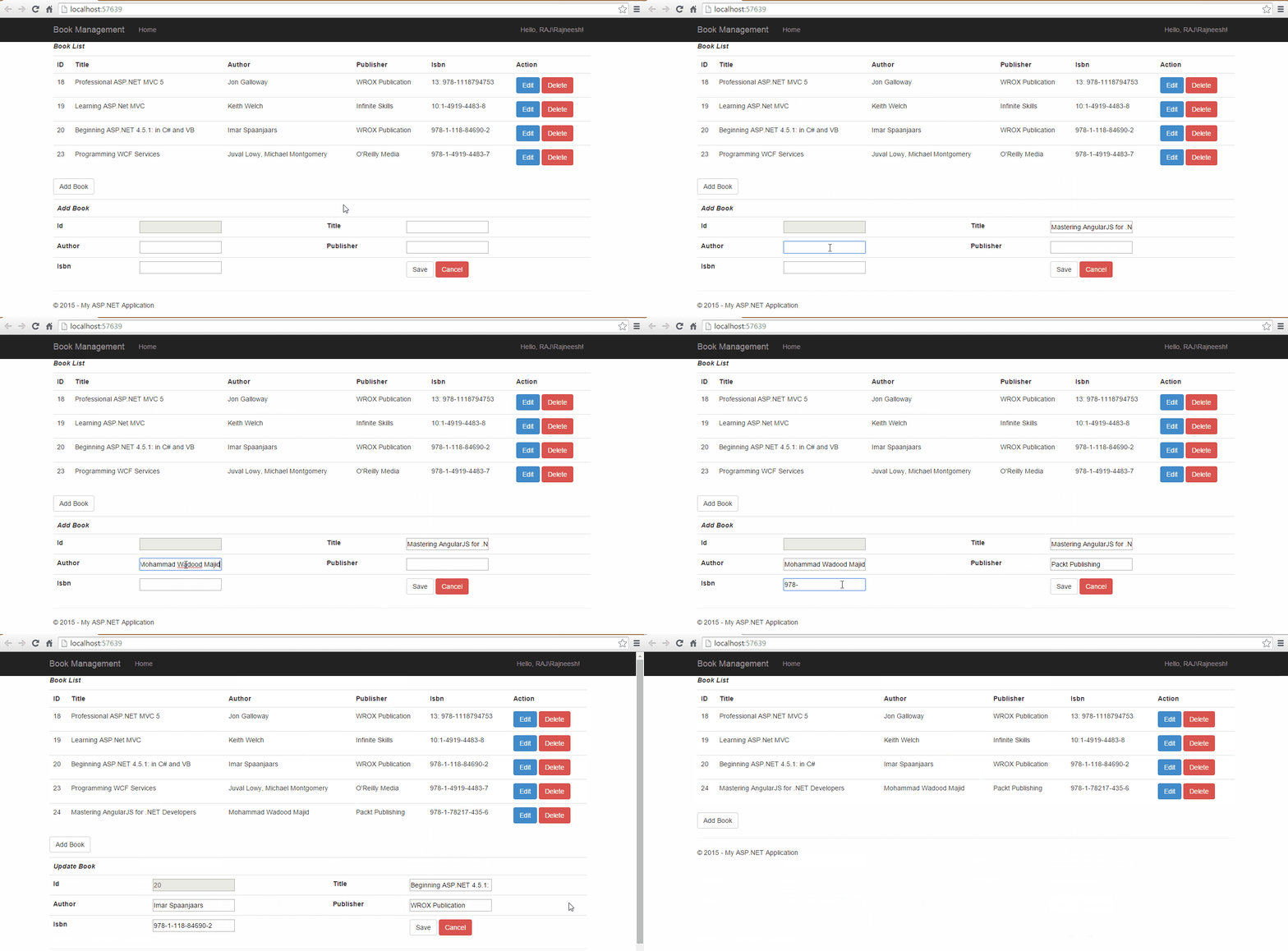
Step 13:- Now Run the application and you can Create, Read, Update & Delete book details,Output like this. 

 CRUD Operation in ASP.NET MVC 4 and AngularJS

Description :-  Create Module.js to define app name  and service.js is use to get and post data from MVC controller to AngularJs controller.
Layout.cshtml page is use to define default layout page which is render whole page and js,css,bootsrap file.
Bundule.config file use to inject all js ,css,bootsrap file in MVC 
Index.cshtml Pgae is your view to perform operation.
Home controller is use to perform action on server side to send and get data in Database.
In route.config file set Controller name as "Home" and action name is "Index" which is given in your MVC controller .this is server side routing.you can use client side routing--
How to use Client side Routing with AngularJs
Bikesh Srivastava AngularJs, MVC
Saturday, February 27, 2016

Basic CRUD Operation in angularjs without Database.

In this blog  we will make simple create, read, update and delete operation using  AngularJS to develop an application for performing CRUD operations with HTML. We will use the following features of AngularJS in our application.I hope it will help you to understand basic logic of Angularjs.
Some Angular Directives used in this example:-
Directives use to add capability of extending HTML. They are the most important part of AngularJS. Here are some in-built directives used in this example.
For more details of directive follow this link:-

  1. ng-app:- Used to auto bootstrap the AngularJS application. This is typically applied to the root of HTML document e.g. <html>, <body>.
  2. ng-controller:- Used to attach the controller class to the view. This helps to expose the action methods and the scope model from the controller to be accessible to view.
  3. ng-model:- Used to bind the scope model declared in the controller to the UI elements e.g. input, select,etc.
  4. ng-repeat:- Used to instantiate the template for each item in the source collection received from the scope of the controller.
  5. ng-click:- Executes the action method form the controller class when the element on the View is clicked
Basic Example of Crud operation using HTML :-
Step 1:-Create simple HTML page.
Step 2:-Include AngularJs library  to support Angularjs in your application inside head tag with script tag.
Crud.html:-
<html>
<head>
<link href="https://maxcdn.bootstrapcdn.com/bootstrap/3.3.6/css/bootstrap.min.css" rel="stylesheet" />
<script src="http://ajax.googleapis.com/ajax/libs/angularjs/1.3.14/angular.min.js"></script>
<script src="library//crud.js"></script>
</head>
<body>
<div ng-app="MyApp" class="container" ng-controller="Book">
<table class="table table-striped table-bordered">
<tr>
<td>ID</td>
<td>
<input type="text" class="form-control" ng-model="item.id" /></td>
</tr>
<tr>
<td>Name</td>
<td>
<input type="text" class="form-control" ng-model="item.name" /></td>
</tr>
<tr>
<td>EmailID</td>
<td>
<input type="text" class="form-control" ng-model="item.email" /></td>
</tr>
<tr>
<td>Password</td>
<td>
<input type="password" class="form-control" ng-model="item.password" /></td>
</tr>
<tr>
<td>Phone</td>
<td>
<input type="text" class="form-control" ng-model="item.phone" /></td>
</tr>
<tr>
<td class="text-right" colspan="2">
<button ng-click="addItem(item)" class="btn btn-primary">
Add
</button>
</td>
</tr>
</table>
<table class="table table-striped table-bordered">
<thead>
<tr>
<th>ID</th>
<th>Name</th>
<th>EmailID</th>
<th>Phone</th>
<th>Edit</th>
<th>Remove</th>
</tr>
</thead>
<tbody>
<tr ng-repeat="item in items">
<td><span ng-hide="editMode">{{item.id}}</span>
<input type="text" ng-show="editMode" ng-model="item.id" />
</td>
<td>
<span ng-hide="editMode">{{item.name}}</span>
<input type="text" ng-show="editMode" ng-model="item.name" />
</td>
<td>
<span ng-hide="editMode">{{item.email}}</span>
<input type="text" ng-show="editMode" ng-model="item.email" />
</td>
<td>
<span ng-hide="editMode">{{item.phone}}</span>
<input type="text" ng-show="editMode" ng-model="item.phone" />
</td>
<td>
<i ng-hide="editMode" ng-click="editMode = true; editItem(item)" class="glyphicon glyphicon-edit"></i>
<i class="glyphicon glyphicon-saved" ng-show="editMode" ng-click="editMode = false"></i>
</td>
<td>
<i ng-click="removeItem($index)" class="glyphicon glyphicon-trash"></i>
</td>
</tr>
</tbody>
</table>
</div>
</body>
</html>
Step 3:-Create js file
Crud.js:-
var app = angular.module('MyApp', []); //create model
app.controller("Book", function ($scope) { //create controller
$scope.items = [];
$scope.addItem = function (item) {  //to add item
$scope.items.push(item);
$scope.item = {};
},
$scope.removeItem = function (index) {   //to remove item
console.log(index);
$scope.items.splice(index, 1)
},
$scope.editItem = function (index) { //to edit item
$scope.editing = $scope.items.indexOf(index);
}
});
Step 4:-Run your page..
Output like this:-


Description:- We are using single controller "Book" and module "app" to manage data from html  page.coming data from html view "item" store in array "items".for delete remove row from array.for show data bind item $scope value in html element using ng-model in table.for good design using bootsrap.css.
For video session follow:-https://www.youtube.com/watch?v=w-mSJshwEzg
Note:-CRUD with database on next blog.


Bikesh Srivastava AngularJs
Friday, February 19, 2016

What is Routing in AngularJs?

AngularJS routes empower you to make diverse URLs for various substance in your application. Having diverse URLs for various substance empowers the client to bookmark URLs to particular substance, and send those URLs to companions and so on. In AngularJS each such bookmarkable URL is known as a routes. 

AngularJS routes empowers you to demonstrate distinctive substance relying upon what routes is picked. A routes is indicated in the URL after the # sign. In this way, the accompanying URL's all point to the same AngularJS application, however every point to various routes
Routing Architecture
Routing Architecture .
 Step 1:-
  1. Create a module named mainApp and load ngRoute as a dependent module in your module.
  2. Configure the routes using $routeProvider.
  3. We use two paths in the example, /home and /viewStudents.
  4. We use only one controller in this example, StudentController
  5. StudentController is initialized with an array of students and a message. We will be showing the message in the home page and the students list in viewStudents page.
  6. Save this file as main.js.
main.js:- 
var mainApp = angular.module("mainApp", ['ngRoute']);
mainApp.config(function($routeProvider) {
$routeProvider
.when('/home', {
templateUrl: 'home.html',
controller: 'StudentController'
})
.when('/viewStudents', {
templateUrl: 'viewStudents.html',
controller: 'StudentController'
})
.otherwise({
redirectTo: '/home'
});
});
mainApp.controller('StudentController', function($scope) {
$scope.students = [
{name: 'Bikesh', city:'Noida'},
{name: 'Brijesh', city:'Sikkim'},
{name: 'Dinesh', city:'UP'}
];
$scope.message = "Click on the hyper link to view the students list.";
});
  Step 2:-Create two html page
  home.html:-
<div class="container">
<h2> Welcome </h2>
<p>{{message}}</p>
<a href="#/viewStudents"> View Students List</a>
</div>
 viewStudents.html:-
<div class="container">
<h2> View Students </h2>
Search:
<br/>
<input type="text" ng-model="name" />
<br/>
<ul>
<li ng-repeat="student in students | filter:name">{{student.name}} , {{student.city}}</li>
</ul>
<a href="#/home"> Back</a>
</div>
  Step 2:-Create index.html page.
  1. The ng-app auto-bootstraps our application mainApp
  2. The ngView directive is the placeholder of the views ( home.html and viewStudents.html).
  3. Include angular.min.js and angular-route.min.js in your application
  4. Include main.js which we have created in the first step.
  5. Save the file as index.html

index.html:-

<!DOCTYPE html>
<html>
<head lang="en">
<meta charset="utf-8">
<title>AngularJS Routing</title>
</head>
<body>
<div ng-app="mainApp">
<ng-view></ng-view>
</div>
<script type="text/javascript" src="https://ajax.googleapis.com/ajax/libs/angularjs/1.2.28/angular.min.js"></script>
<script type="text/javascript" src="https://ajax.googleapis.com/ajax/libs/angularjs/1.2.28//angular-route.min.js"></script>
<script type="text/javascript" src="main.js"></script>
</body>
</html>

Run your application:-

  1. Save all the files in the same location.
  2. open index.html with your browser or type the URL in your browser, For example:yourLocationURL/index.html
Note:-You can refer this video to more understanding
Bikesh Srivastava AngularJs

Life Is Complicated, But Now programmer Can Keep It Simple.