11+ Year IT Industry Experience, Working as Technical Lead with Capgemini | Consultant | Leadership and Corporate Trainer | Motivational and Technical Speaker | Career Coach | Author | MVP | Founder Of RVS Group | Trained more than 4000+ IT professionals | Azure | DevOps | ASP.NET | C# | MVC | WEB API | ANGULAR | TYPESCRIPT | MEAN | SQL | SSRS | WEB SERVICE | WCF... https://bikeshsrivastava.blogspot.in/ http://bikeshsrivastava.com/
Thursday, July 7, 2016

What is MERGE Query in SQL ?

Today i am clarify about how to Inserting, Updating, and Deleting Data by Using MERGE. In SQL Server 2008, you can perform insert, update, or delete operations in a single statement using the MERGE statement in SQL database.

Why we use MERGE statement in SQL?
In a typical data warehousing application, regularly amid the ETL cycle you have to perform INSERT, UPDATE and DELETE operations on a TARGET table by coordinating the records from the SOURCE table. For instance, an items measurement table has data about the items; you have to match up this table with the most recent data about the items from the source table. You would need to compose separate INSERT, UPDATE and DELETE proclamations to revive the objective table with an overhauled item list or do lookups. In spite of the fact that it is by all accounts straight forward at first look, yet it gets to be unwieldy when you have do it all the time or on different tables, even the execution debases fundamentally with this methodology. In this tip we will stroll through how to utilize the MERGE explanation and do this in one pass.


In SQL 2008 you can perform insert, update, or delete operations in a single statement using the MERGE statement . The MERGE statement allows you to join a data source table  with a target table or view, and then perform multiple actions against the target based on the results of that join. For example, you can use the MERGE statement to perform the given operations below.

Operation can perform using MERGE:-
1.According condition  insert,update,delete row in target table.If the row exists in the target table, update one or more columns; otherwise, insert the data into a new row.
2.Synchronize two tables.Insert, update, or delete rows in a target table based on differences with the source table .

Clauses(keyword) using  in MERGE Query.

1.MERGE -
The MERGE clause(keyword) specifies the table or view that is the target of the insert, update, or delete operations.
2.USING -
The USING clause(keywordspecifies the data source table being joined with the target table.
3.ON -
The ON clause(keywordspecifies the join conditions that determine where the target table and source table  match.
4.WHEN -
The WHEN clause(keyword(WHEN MATCHED, WHEN NOT MATCHED BY TARGET, and WHEN NOT MATCHED BY SOURCE) specify the actions to take based on the results of the ON clause(keywordand any additional search criteria specified in the WHEN clauses.
5.OUTPUT -
The OUTPUT clause(keywordreturns a row for each row in the target table  that is inserted, updated, or deleted.

Syntax for MERGE Query:-
MERGE [AS TARGET] 
USING [AS SOURCE] 
ON 
[WHEN MATCHED 
THEN ] 
[WHEN NOT MATCHED [BY TARGET] 
THEN ] 
[WHEN NOT MATCHED BY SOURCE 
THEN ];
 Simple Example with Query:-

Step 1:-Create two table source and target table and insert data .
 --Create a target table   
 CREATE TABLE Products ( ProductID INT PRIMARY KEY, ProductName VARCHAR(100), Rate MONEY )   
 GO   
 --Insert records into target table   
 INSERT INTO Products VALUES (1, 'Tea', 10.00), (2, 'Coffee', 20.00), (3, 'Muffin', 30.00), (4, 'Biscuit', 40.00)   
 GO   
 --Create source table   
 CREATE TABLE UpdatedProducts ( ProductID INT PRIMARY KEY, ProductName VARCHAR(100), Rate MONEY )   
 GO   
 --Insert records into source table   
 INSERT INTO UpdatedProducts VALUES (1, 'Tea', 10.00), (2, 'Coffee', 25.00), (3, 'Muffin', 35.00), (5, 'Pizza', 60.00)   
 GO   
 SELECT * FROM Products   
 SELECT * FROM UpdatedProducts   
 GO
Step 2:-Now i am going to use MERGE query to perform action on table:-
 --Synchronize the target table with
--refreshed data from source table
MERGE Products AS TARGETUSING UpdatedProducts AS SOURCE ON  

(TARGET.ProductID = SOURCE.ProductID) 

--When records are matched, update 
--the records if there is any change
WHEN MATCHED AND TARGET.ProductName <> SOURCE.ProductName 

 OR TARGET.Rate <> SOURCE.Rate

 THEN 

UPDATE SET TARGET.ProductName = SOURCE.ProductName, TARGET.Rate = SOURCE.Rate 

--When no records are matched, insert
--the incoming records from source
--table to target table
WHEN NOT MATCHED BY TARGET THEN INSERT (ProductID, ProductName, Rate) VALUES  

(SOURCE.ProductID, SOURCE.ProductName, SOURCE.Rate)

--When there is a row that exists in target table and
--same record does not exist in source table
--then delete this record from target table
WHEN NOT MATCHED BY SOURCE THEN DELETE


--$action specifies a column of type nvarchar(10) 
--in the OUTPUT clause that returns one of three 
--values for each row: 'INSERT', 'UPDATE', or 'DELETE', 
--according to the action that was performed on that row
OUTPUT $action, DELETED.ProductID AS TargetProductID, DELETED.ProductName AS  

TargetProductName, DELETED.Rate AS TargetRate, INSERTED.ProductID AS SourceProductID,

 INSERTED.ProductName AS SourceProductName, INSERTED.Rate AS SourceRate;  

SELECT @@ROWCOUNT; 
GO
Step 3:-Run script. After this script output is showing below in image.  There were 2 updates, 1 delete and 1 insert in target table.
Merged Example
If we select all records from the Products(target) table we can see the final results.  We can see the Coffee rate was updated from 20.00 to 25.00 in target table , the Muffin rate was updated from 30.00 to 35.00 in target table, Biscuit was deleted and Pizza was inserted inside target table.Result is showing like this.
Merged output
Description :-
The MERGE SQL statement requires a semicolon (;) as a statement terminator in SQL server database . Otherwise Error 10713 is raised when a MERGE statement is executed without the statement terminator  SQL server database.
  • Whenever you  used after MERGE, @@ROWCOUNT returns the total number of rows inserted, updated, and deleted to the client in SQL server database.
  • In SQL at least one of the three MATCHED clauses must be specified when using MERGE statement; the MATCHED clauses can be specified in any order. However a variable cannot be updated more than once in the same MATCHED clause.
  • Of course it's obvious, but just to mention, the person executing the MERGE statement should have SELECT Permission on the SOURCE Table and INSERT, UPDATE and DELETE Permission on the TARGET Table.
  • MERGE SQL statement improves the performance as all the data is read and processed only once whereas in previous versions three different statements have to be written to process three different activities (INSERT, UPDATE or DELETE) in which case the data in both the source and target tables are evaluated and processed multiple times; at least once for each statement.
  • MERGE SQL statement takes same kind of locks minus one Intent Shared (IS) Lock that was due to the select statement in the ‘IF EXISTS' as we did in previous version of SQL Server.
  • For every insert, update, or delete action specified in the MERGE statement, SQL Server fires any corresponding AFTER triggers defined on the target table, but does not guarantee on which action to fire triggers first or last. Triggers defined for the same action honor the order you specify.
Bikesh Srivastava SQL

What is difference between OLAP and OLTP ?

What is the nature of the application (OLTP or OLAP), when you design database?

When you begin your database design  plan the important thing to investigate is the way of the application you are planning for, is it Transnational or Analytical. You will discover numerous engineers as a matter of course applying standardization rules without considering the way of the application and afterward later getting into execution and customization issues. As said, there are two sorts of uses: exchange based and scientific based, how about we comprehend what these sorts are.

Transnational :- In this sort of utilization, your end client is more inspired by CRUD, i.e., Creating,Reading ,Updating , and Deleting records. The official name for such a sort of database is OLTP. 


Analytical:- In these sorts of utilizations your end client is more intrigued by analysis , reporting, forecasting , and so on. These sorts of databases have a less number of additions and Updation. The principle goal here is to bring and break down information as quick as could be expected under the circumstances. The official name for such a sort of database is OLAP.
Shown in Image below:-
OLAP,OLTP

In other way  you think Insert, Update, and delete are more conspicuous then go for Normalize  table configuration, else make a level denormalized database structure.

Denormalize


What is difference between OLAP and OLTP ?

The following table summarizes the major differences between OLTP and OLAP system design.

OLTP System
Online Transaction Processing
(Operational System)

OLAP System
Online Analytical Processing
(Data Warehouse)

Source of data::
Operational data; OLTPs are the original source of the data.
Consolidation data; OLAP data comes from the various OLTP Databases.
Purpose of data::
To control and run fundamental business tasks.
To help with planning, problem solving, and decisionsupport.
What the data::
Reveals a snapshot of ongoing business processes.
Multi-dimensional views of various kinds of business activities
Inserts and Updates::
Short and fast inserts and updates initiated by end users.
Periodic long-running batch jobs refresh the data.
Queries::
Relatively standardized and simple queries Returning relatively few records.
Often complex queries involving aggregations.
Processing Speed::
Typically very fast.
Depends on the amount of data involved; batch datarefreshes and complex queries may take many hours; query speed can be improved by creating indexes.
Space Requirements::
Can be relatively small if historical data is archived.
Larger due to the existence of aggregation structures and history data; requires more indexes than OLTP.
Highly normalized with many tables.
Typically de-normalized with fewer tables; use of star and/or snowflake schemas.
Backup and Recovery::
Backup religiously; operational data is critical to run the business, data loss is likely to entail significant monetary loss and legal liability.
Instead of regular backups, some environments may consider simply reloading the OLTP data as a recovery method.

ETL Process - Extract, Transform and Load

ETL stands for Extract, Transform and Load, which is a procedure used to gather information from different sources, change the information relying upon business rules/needs and load the information into a destination database. The need to utilize ETL emerges from the way that in cutting edge registering business information lives in numerous areas and in numerous incongruent organizations. For instance business information may be put away on the document framework in different organizations (Word docs, PDF, spreadsheets, plain content, and so forth), or can be put away as email records, or can be kept in a different database servers like MS SQL Server, Oracle and MySQL for instance. Taking care of this business data proficiently is an incredible test and ETL assumes an essential part in taking care of this issue.
Bikesh Srivastava Interview Question

What is best Database design guideline approach.

Today I will clarify about "What is good approach to design database in SQL server or oracle"Now days most developer are forget to follow these thing when design database for any type of application.


1.Naming convention
2.Data type 
3:-Indexing
4.Normalization
5.RDBMS concept 
6.Performance 
7.Replication
8.Constraints 
9.Clustering
10.Stored procedure
11.Comment line

Follow these step to create good database architecture :-


  • Always use comment line inside stored procedure,function,trigger in sql query.
  • You should use stored procedure instead of inline query for application performance .
  • Use Cascades, Triggers, and Constraints according requirment .
  • Always try to avoid overloading of fields name
  • Always use well defined and consistent names for tables and columns in any database (e.g. Employee, EmployeeNameEmployeeID ...).
  • Always  use singular word  for table names (i.e. use EmployeeName instead of EmployeeNames). Table represents a collection of entities, there is no need for plural names for table.
  • Don’t use spaces for SQL table names. Otherwise you will have to use ‘{‘, ‘[‘, ‘“’ etc. characters or sign  to define tables (i.e. for accessing table  Employee Name you'll write “Employee Name”. EmployeeName is much better).
  • Don’t use unnecessary prefixes or suffixes when you'll create table names (i.e. use Employee instead of tbl_Employee, Employeetable etc.).
  • Keep passwords as encrypted for security purpose . Decrypt them in application when required in SQL server database.
  • Always  use integer id fields for all tables in SQL database . If id is not required for the time being, it may be required in the future purpose  (for association tables, indexing ...).
  • Always choose columns with the integer data type (or its variants) for indexing. varchar column indexing will cause performance problems in SQL server database.
  • Always  use bit fields for boolean(true/false) values. Using integer or varchar is unnecessarily storage consuming. Also start those column names with “Is” (e.g. IsActive )
  • Always  provide authentication for database access. Don’t give admin role to each user in SQL server database.
  • Always  try to Avoid “select *” queries until it is really needed. Use "select [required_columns_list]" for better performance in SQL database. Always use select query with column name.(e.g. "Select Id,Name from Employee"). 
  • Always use an ORM (object relational mapping) framework (i.e. Nhibernate, iBatis ,Entityframework) if application code is big enough. Performance issues of ORM based frameworks can be handled by detailed configuration parameters.
  • For big, sensitive and mission critic database systems,Always  use disaster recovery and security services like failover clustering, auto backups, replication etc in any type of database.
  • Always use constraints (Primary key,foreign key, check, not null ...) for data integrity. Don’t give whole control to application code.you can 
  • Always use indexes for frequently used queries on big tables from database . Analyser tools can be used to determine where indexes will be defined using ETL process. For queries retrieving a range of rows, clustered indexes are usually better in SQL. For point queries, non-clustered indexes are usually better in SQL query.
  • According application level security database server and the web server must be placed in different machines. This will provide more security (attackers can’t access data directly on your server ) and server CPU and memory performance will be better because of reduced request number and process usage from application.
  • Image and blob data columns must not be defined in frequently queried tables because of performance issues in SQL database query. These data must be placed in separate tables and their pointer can be used in queried tables.
  • Normalization must be used as required,to reduce redundancy,  to optimize the performance. Under-normalization will cause excessive repetition of data, over-normalization will cause excessive joins across too many tables. Both of them will get worse performance in sql query.
  • Bikesh Srivastava Interview Question
    Tuesday, July 5, 2016

    About Me

                Technical Consultant, Speaker,  MVP, Author, and Trainer


    " All power is within you, you can do anything & everything if you believe in that."

    "Always love and trust yourself more than others."

       Name:                          Bikesh Kumar Srivastava
    My Photo
    About me:                       
    About Me:  10+ Year IT Industry Experience, Working as Technical Lead with HytechPro | Consultant | Leadership and Corporate Trainer | Motivational and Technical Speaker | Career Coach | Author | MVP | Founder Of RVS Group | Trained more than 4000+ IT professionals | Azure | DevOps | ASP.NET | C# | MVC | WEB API | ANGULAR | TYPESCRIPT | MEAN | SQL | SSRS | WEB SERVICE | WCF... https://bikeshsrivastava.blogspot.in/ http://bikeshsrivastava.com/
    For more details visit below given links.
    Qualification: B.Tech IT 2008-2012 from UPTU
    Location: Noida
    Exp.: 10+ in IT industry
    College : 
    B.tech (Information technology) in 2008-2012 ,RITM Lucknow (UPTU)
    Profession: 
    Full Stack Development, Consulting, Leading, Training, Writing, Speaking.
    Technical Skill: 
    Azure | DevOps | Agile |
    ASP.NET | C# | MVC | WEB API | ANGULAR | TYPESCRIPT | MEAN | 
    SQL | SSRS | WEB SERVICE | WCF| ANGULAR.
    Current Company: 
    Hytech proffesionals India Pvt Ltd.(A-89 sector 63 Noida 201301) India From 1st June 2015 to till date.
    Contact Number: 
    1:- 08802592478 (Whatsapp)
    Mail Id:
    1:-Bikesh1988@gmail.com (Public)
    2:-Bikesh.net@gmail.com
    3:-er.bks11@gmail.com
    4:-Bikesh.Srivastava@hytechpro.com (Official mail id)
    Skype Id:       bikesh.kumar.srivastava
    Facebook Id:   https://www.facebook.com/Bikeshsrivastav
    LinkedIn Id:
    Twitter Id:https://twitter.com/Bikeshsrivastav
    G+ Id:
    Permanent Address:
    Tanda Ambedkar nagar (224190) UP
    Current Address:
    Panchsheel Hynish Gr. Noida Sector 1
    Work experience :
    10+ year experience in IT field on Microsoft technologies.
    Hobbies:Playing cricket, Listening songs, Blogging, Speaking, writing
    Strength/ Weakness:
    Confident, Adaptable, Positive thinking, creative mind, Smart thinking, Quick learner,


    Bikesh Srivastava Awards & Achievements
    Monday, July 4, 2016

    How to make textbox as autocomplete using angularjs in MVC 5 without jquery ?

    Today i am going to explain about Auto complete textbox using Angular JSin MVC 5.I may found in some web index and a few sites while we are writing the initial two letters of word it demonstrates some proposed rundown to select.This Auto complete content boxes generally utilized as a part of continuous tasks to expand the client intelligence with site.Now in this post we going to take a gander at how it is actualized in Angular js.
    For example see below given  google auto complete search box in in image:-


    Step 1: Create New Project in Visual studio 2015.

    Go to File => New => Project => ASP.NET  Web Application  => Entry Application Name => Click OK => Select Empty template => Checked MVC =>click OK

    Step 2: Add a database to project.

    Go to Solution Explorer => Right Click on App_Data folder => Add => New item => Select SQL Server Database Under Data => Enter Database name => Add.

    Step 3: Create a  sql table to store data

    1.Open Database =>Right Click on Table folder => Add New Table => Add Columns => Save => Enter table name => Ok.
    2.In this tutorial I have created a sql table name is(Country) to store country list that will appear in the auto suggestion list(This table contains CountryID,CountryName as columns).

    Step 4: Add Entity Data Model using Entity framework.

    1.Go to Solution Explorer =>Right Click on Project name form Solution Explorer => Add => New item => Select ADO.net Entity Data Model under data => Enter model name => Add.
    2.A popup window will come (Entity Data Model Wizard) => Select Generate from database =>click Next
    3.Chose your data connection => select your database =>Select Entity framework version(5.0 or 6.0) next => Select tables =>Enter Model Namespace name=>Click on Finish.

    Step 5: Add Angular reference files in MVC application.

    1.Add below reference files in _Layout.cshtml page.(you can download this files from here angucomplete-alt.css and angucomplete-alt.js.
    2.Add this files in <head> tag.

    <!--Angualr refrence file for auto complete text box starts--><script src="~/Scripts/angular.min.js"></script>
    <script src="~/Scripts/angular-route.min.js"></script>
    <script src="~/Scripts/angucomplete-alt.js"></script>
    <link href="~/Content/angucomplete-alt.css" rel="stylesheet" />
    <script src="~/Scripts/app.js"></script>
    <!--Angualr refrence file for auto complete text box starts-->

    Step 6: Add Controller in MVC application 

    1.Add Controller by right click on Controllers folder --> Add --> Controller -->name it as Home Controller
    2.Replace the code with below code..

    using System;
    using System.Collections.Generic;
    using System.Linq;
    using System.Web;
    using System.Web.Mvc;
    namespace AngularAutoCompleteTextbox.Controllers
    {
        public class HomeController : Controller
        {
            public ActionResult Index()
            {
                return View();
            }
            public ActionResult getAllCountries()
            {
                using (DatabaseEntities db = new DatabaseEntities()) {
                    var countrylist = db.Countries.OrderBy(a => a.CountryName).ToList();
                    return new JsonResult { Data=countrylist,JsonRequestBehavior=JsonRequestBehavior.AllowGet};
                }
            }
        }
    }
    3.Index action is used to render the view.
    4.getAllCountries method gets the data from database and sends it to the Angular Controller in Json format.

    Step 7: Add Angular scripts to project as controller

    1.Right click Scripts folder --> Add Javascript file (i named it app.js).
    2.Replace it with the below code..

    var app = angular.module('myapp', ['angucomplete-alt']); //add angucomplete-alt dependency in app
    app.controller('AutoCompleteController', ['$scope', '$http', function ($scope, $http) {
        $scope.Countries = [];
        $scope.SelectedCountry = null;
        //event fires when click on textbox
        $scope.SelectedCountry = function (selected) {
            if (selected) {
                $scope.SelectedCountry = selected.originalObject;
            }
        }
        //Gets data from the Database
        $http({
            method: 'GET',
            url: '/Home/getAllCountries'
        }).then(function (data) {
            $scope.Countries = data.data;
        }, function () {
            alert('Error');
        })
    }]);

    Step 8: Add view as cshtml page to display UI

    1.Right click Index action --> Add View --> name it --> Click Add.
    2.Replace the code with below code in Index.cshtml page.

    @{
        ViewBag.Title = "Bikesh Srivastava UI Page";
    }
    <div class="container">
        <h2>Autocomplete textbox in AngularJS</h2>
        <div ng-app="myapp">
            <div ng-controller="AutoCompleteController">
                <div angucomplete-alt id="txtAutocomplete" placeholder="Type country name" pause="100"
                     selected-object="SelectedCountry" local-data="Countries" search-fields="CountryName"
                     title-field="CountryName" minlength="1" input-class="form-control" match-class="highlight">
                </div>
                <!--display selected country-->
                <div ng-show="SelectedCountry">
                    Selected Country : {{SelectedCountry.CountryName}}
                </div>
            </div>
        </div>
    </div>
    3.In div element we must add angucomplete-alt.we bind the data using local-data attribute inside index.cshtml page.
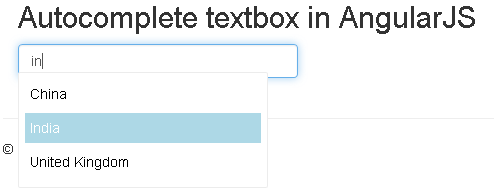
    4.After running the application we will get...
    auto implement textbox using angular in mvc5
    Bikesh Srivastava Angular, MVC

    Life Is Complicated, But Now programmer Can Keep It Simple.